Graphical User Interface
GUI, Widget, Window
- Definition
- An interface that presents the user with graphical components, such as windows, menus, icons, and buttons, that can be operated with a pointing device such as a mouse.
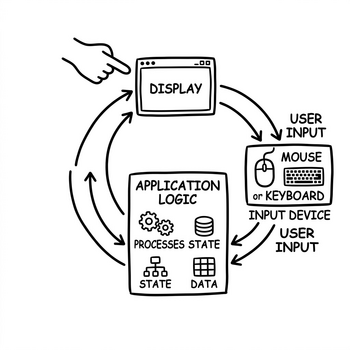
How does it work?
A graphical user interface (GUI) builds the application interface out of graphical elements, called widgets, instead of text commands. Windows, buttons, text fields, menubars, toolbars, lists, and tree views each define the space the user can interact with and how the application responds.
A GUI is usually event-driven: the operating system, a browser, or another host environment detects user input (mouse clicks, keyboard presses) and routes these as events to the widget the user interacted with. This widget then triggers the associated behavior of the application, which in turn updates the interface.
In desktop applications the components are often provided by a widget toolkit, while in web applications they come from the HTML, CSS, and JavaScript of the browser environment.
When should you use it?
- When the intended users are not comfortable with or aware of command line interfaces.
- When the interaction benefits from visuals, such as selecting an item, dragging, drawing, or seeing a preview.
- When the application should be usable by a broad audience with little or no training.